
First off, what's mpd?
mpd is a server application for playing music, which you can connect to using a variety of clients. You can use it to have access to your music files from anywhere on your network (and beyond, of course, depending on your network setup), or to set up a local streaming server for smart speakers around your home, or use it as centralised source for playlists or scrobbling.
Generally, it allows you to decouple what you do with your music from where it's stored. Personally, I use it to have my music on my NAS and be able to easily play it from anywhere, using whichever client best fits the device I'm using.
So, the minimum dependencies for using this little script are that you have an mpd server running somewhere and the basic mpc CLI client installed (which is generally recommended). Technically, you'll also need awk installed, but I suspect you already do; and, of course, rofi (or wofi or whichever your preferred fork may be).
So, why not use one of the other clients?
I actually do mostly use rmpc when listening to music, as I often have a few favourite albums queued up, and having a playlist queue that I can jump around is convenient. However, its library navigation is a bit clunky and I don't always want to switch away from whatever I'm doing, just to quickly start some music or throw on an album.
So, I thought: what if I could have something like Telescope and fzf in Vim, but for my music - and preferably with a nice little interface? And also, shouldn't it be as quick and easy to play or add music to my playlist, as it is to find files?
I'm already used to piping lolcate into rofi to quickly pull up files from my NAS, so why not do something similar for mpd?
Presenting: rofi-mpd-control
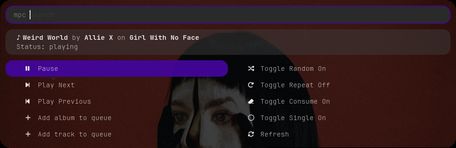
rofi window shown by rofi-mpd-controlrofi-mpd-control is basically just piping the output of mpc into rofi and a helper script to search the music library, with some nice parsing of mpc's output to make it look nice in rofi.
The parsing of output is rather basic: we ask mpc to output the current status information, each part deliminated by four tab-characters (an easily parsable deliminator that's also simple to debug and unlikely to appear naturally) and then ask awk for each part.
Search and adding an album or track is a separate script that's called by rofi-mpd-control, called rofi-mpd-search:

rofi showing a search for an album
rofi showing a search for a trackYou can find the code for it in my NixOS flake repo. In order to run it, you'll also need the following scripts:
- rofi-mpd-search.sh: to find and add tracks and albums.
Depends on:rofi,mpcandawk rofi-themed: to launch rofi with the my preferred theme.
You can replace that with justrofiwithout breaking anything.
My definition is just:rofi -theme ${inputs.rofi-themes-newmanls}/themes/rounded-purple-dark.rasi -theme-str '* { bg3: #43069af2; }' "$@"
Also worth noting is that the background cover image will be much faster to load, if you have rmpc installed, as the default mpc client is quite slow at fetching cover-art.
Nix
If you have Nix installed or are on NixOS, you can also just run the script directly from my repo, without having to worry about dependencies or themes - like this:
nix shell 'sourcehut:~cybolic/nix-system#rofi' --command rofi-mpd-control
Or if you want to try just the search script:
# to find and add an album
nix shell 'sourcehut:~cybolic/nix-system#rofi' --command rofi-mpd-search
# or, to just find a track
nix shell 'sourcehut:~cybolic/nix-system#rofi' --command rofi-mpd-search track
The scripts just use mpc, so if you already have mpd working, they should just work without any configuration needed.
How I usually use it
I launch the script from a shortcut through xremap, so my most common use-cases are:
- Play/Pause: [shortcut]
Enter(it's nice to see what's currently paused before playing) - Adding an album: [shortcut]
bEnter(for "al b um") - Adding a track: [shortcut]
cEnter(for "tra c k")
(I also have direct xremap bindings for launching rofi-mpd-search, as that's usually faster than finding things through rmpc)
In closing
I invite you to take a look at the linked scripts. Not just for the nice (in my opinion) styling of rofi, but also as a reminder of how simple it can be to build something that looks and behaves like a real application, using nothing more than commands piped into each other. The UNIX philosophy still looks good 50 years later 😎.